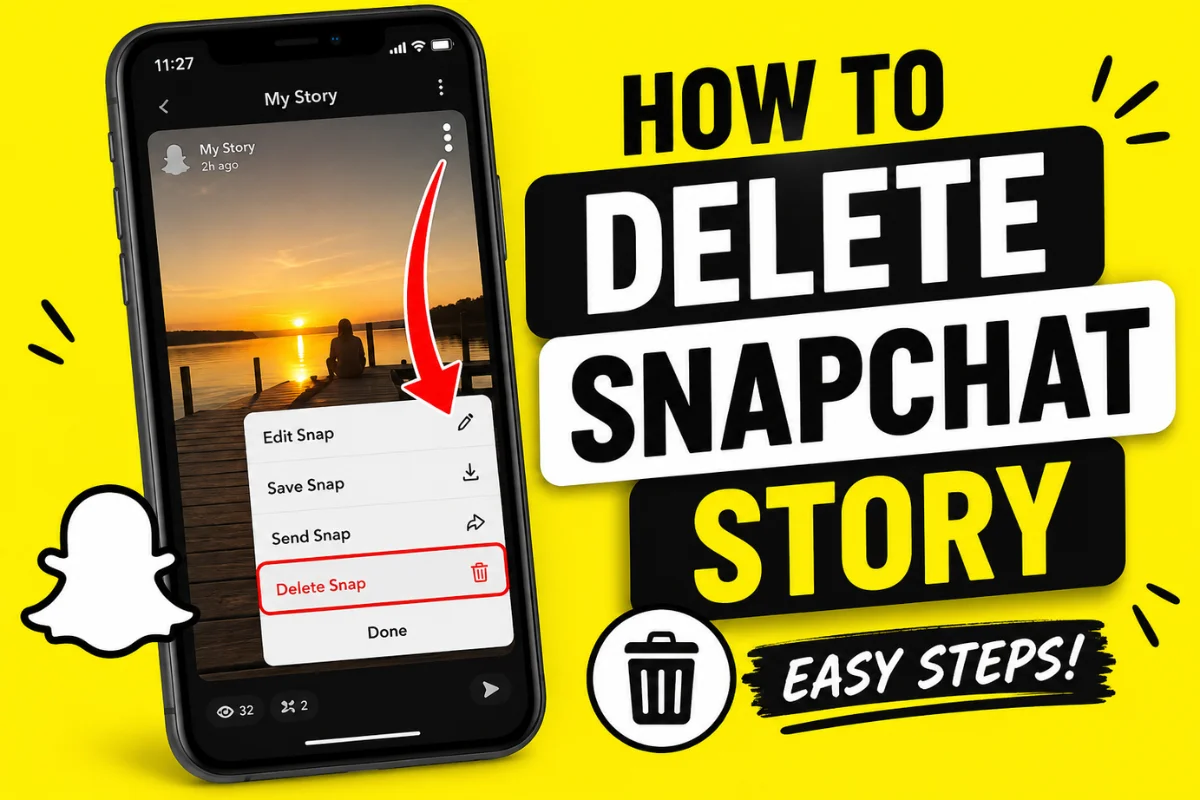
How to Delete a Snapchat Story?
Have you accidentally posted the wrong photo or video on Snapchat? Don’t worry. Snapchat allows you to remove your Story in just a few taps.
Whether you shared a personal picture by mistake, uploaded the wrong video, or simply changed your mind, deleting a Snapchat Story is quick and easy.
This guide explains exactly how to delete a Snapchat Story on Android and iPhone, what happens after deleting it, whether others can still see it, and answers the most common questions users ask.
Can You Delete a Snapchat Story?
Yes, you can.
Snapchat gives users complete control over the Stories they post. You can delete a Story at any time before it expires naturally after 24 hours.
Once deleted, the Story is removed from your profile and is no longer available for your friends or followers to view.
However, if someone already watched it or took a screenshot before deletion, you cannot remove that copy.
How to Delete a Snapchat Story
Follow these simple steps.
Step 1: Open Snapchat
Launch the Snapchat app on your Android or iPhone.
Make sure you’re logged into the account where the Story was posted.
Step 2: Go to Your Profile
Tap your Bitmoji or Profile icon in the top-left corner.
Your profile page will open.
Here you’ll see:
- My Story
- Public Story (if enabled)
- Spotlight posts
- Memories
Step 3: Open Your Story
Under My Stories, tap the Story you want to remove.
The Story will begin playing.
Step 4: Tap the Three Dots
While viewing the Story, tap the three-dot (⋮) menu in the top-right corner.
A menu will appear with several options.
Step 5: Select Delete Snap
Tap Delete Snap.
If your Story contains multiple photos or videos, you can remove only the one you don’t want instead of deleting the entire Story.
Step 6: Confirm Deletion
Snapchat will ask for confirmation.
Tap Delete.
Your Story disappears immediately from your profile.
How to Delete an Entire Snapchat Story
If your Story contains multiple Snaps, you’ll need to delete each one individually.
Currently, Snapchat does not provide a one-tap option to erase every Snap in a Story simultaneously.
Simply repeat the deletion process for each Snap until the Story becomes empty.
How to Delete a Public Story
Deleting a Public Story works almost the same way.
Follow these steps:
- Open Snapchat.
- Go to your Profile.
- Open your Public Story.
- Tap the Snap you want to remove.
- Tap the three-dot menu.
- Select Delete Snap.
- Confirm deletion.
The removed Snap will no longer appear in your Public Story.
Can You Delete a Story Before Anyone Sees It?
Yes.
If you notice your mistake immediately after posting, you can delete the Story before your friends open it.
Keep in mind that Snapchat works very quickly.
If someone already viewed the Story before you deleted it, that view cannot be undone.
What Happens After You Delete a Snapchat Story?
Deleting a Story removes it from Snapchat’s servers for viewing.
Here’s what happens afterward.
Your Story disappears
Friends can no longer open it.
It is removed from your profile
Visitors won’t see the deleted Story.
Existing views stay counted
If people already watched it, those views already happened.
Screenshots remain
Deleting cannot remove screenshots or screen recordings others already saved.
Can Someone Still See My Story After I Delete It?
Usually, no.
Once Snapchat processes the deletion, the Story is removed from public viewing.
However, someone might still have access if:
- They already opened it.
- They took a screenshot.
- They recorded the screen.
- Their app temporarily cached the Story before refreshing.
In most situations, deleting the Story removes it almost immediately.
How to Delete a Private Story
Private Stories can also be deleted easily.
Simply:
- Open your Profile.
- Open the Private Story.
- Select the Snap.
- Tap the three dots.
- Choose Delete Snap.
- Confirm.
The Story disappears for everyone included in that Private Story.
Can You Recover a Deleted Snapchat Story?
No.
Once you delete a Story manually, Snapchat does not offer a recovery option.
Unless you saved the original photo or video to:
- Memories
- Camera Roll
- Device storage
the Story is permanently removed.
How to Save a Story Before Deleting It
If you’d like to keep a copy before removing it, save it first.
Here’s how:
- Open your Story.
- Tap the three dots.
- Choose Save.
- Save it to:
- Memories
- Camera Roll
- Both
After saving, you can safely delete the Story.
Why Can’t I Delete My Snapchat Story?
Sometimes users experience problems deleting Stories.
Here are the most common reasons.
Slow Internet Connection
Snapchat needs an internet connection to sync changes.
Switch to Wi-Fi or mobile data and try again.
App Needs Updating
Older versions of Snapchat may experience bugs.
Install the latest update from your app store.
Temporary Server Issues
Snapchat occasionally experiences server outages.
Wait a few minutes and try again.
App Cache Problems
Cached data can sometimes prevent changes from appearing.
Clearing the Snapchat cache often fixes the issue.
You’re Logged Into Another Account
Double-check that you’re using the account where the Story was originally posted.
How to Clear Snapchat Cache
If deletion isn’t working, clearing the cache may help.
Android
- Open Snapchat.
- Go to Settings.
- Scroll to Clear Cache.
- Tap Continue.
iPhone
The steps are nearly identical.
Clearing cache does not delete your chats, memories, or friends.
Tips Before Posting a Snapchat Story
Deleting Stories is easy, but avoiding mistakes is even better.
Here are a few helpful habits:
- Preview your Story before posting.
- Double-check your audience.
- Remove location stickers if privacy matters.
- Review captions for spelling mistakes.
- Make sure the correct photo or video is selected.
These simple checks can save you from deleting a Story later.
Frequently Asked Questions
Does deleting a Snapchat Story notify friends?
No.
Snapchat does not send notifications when you delete a Story.
Can I delete someone else’s Story?
No.
You can only delete Stories posted from your own Snapchat account.
Can I delete one Snap from my Story?
Yes.
Each Snap can be deleted individually without removing the rest of your Story.
Does deleting a Story remove screenshots?
No.
Screenshots and screen recordings already taken remain with the other person.
Will deleting a Story remove replies?
Story replies that have already been received may remain in your chat history, depending on the conversation.
Can I delete a Story after 24 hours?
Normally, Stories disappear automatically after 24 hours.
Once expired, there’s usually no need to delete them manually.
Final Thoughts
Deleting a Snapchat Story only takes a minute and is the fastest way to remove content you no longer want others to see. Whether you accidentally posted the wrong Snap, shared something too quickly, or simply changed your mind, Snapchat lets you delete individual Snaps or an entire Story before it expires.
To avoid future mistakes, always preview your Story, confirm your audience, and save important photos or videos before deleting them. Following these simple habits helps you stay in control of what you share and protects your privacy on Snapchat.