How to See Who Screenshotted Your Public Snapchat Story
Snapchat is built around sharing moments that disappear after a short time. However, screenshots can turn those temporary moments into permanent copies. That’s why many users wonder: can you see who screenshotted your public Snapchat story?
The answer is a bit more complicated than a simple yes or no. Snapchat does provide screenshot indicators in certain situations, but public stories follow different rules compared to private stories and direct snaps.
In this guide, you’ll learn exactly how Snapchat screenshot notifications work, how to check if someone screenshotted your public story, what limitations exist, and what recent Snapchat updates mean for creators and regular users.
Can You See Who Screenshotted Your Public Snapchat Story?
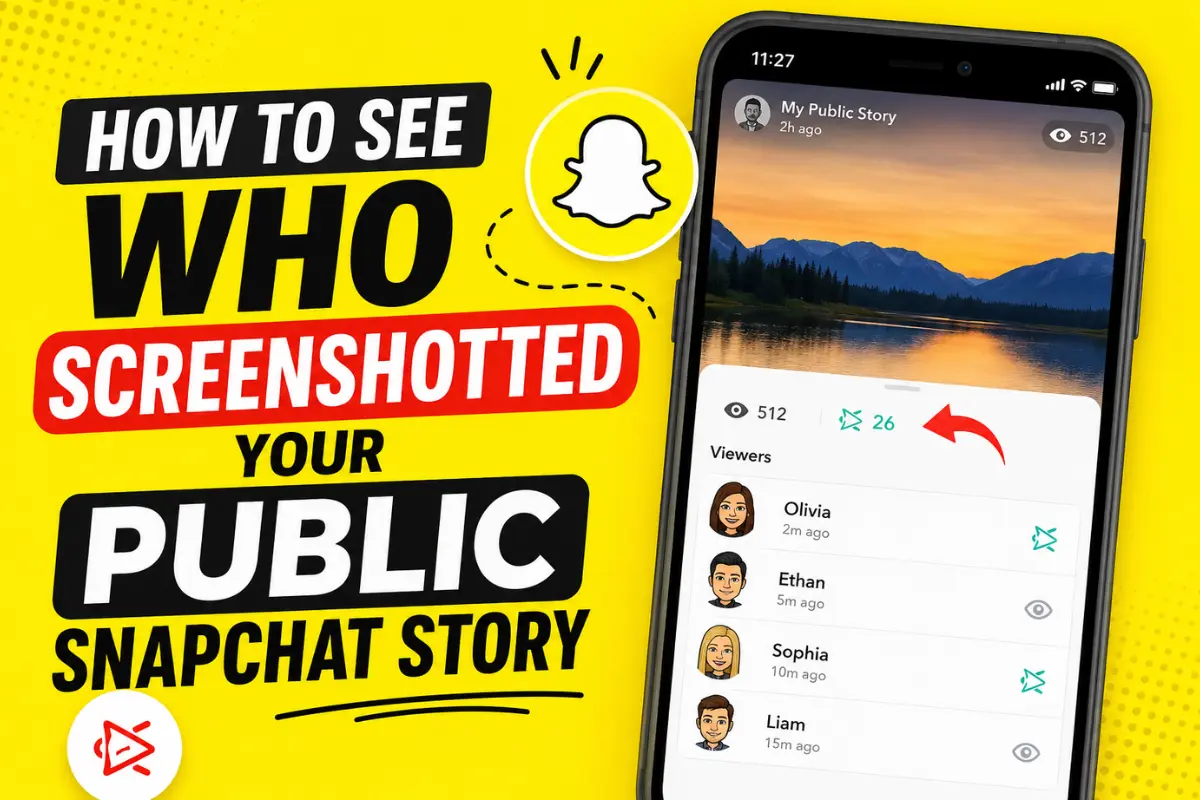
Yes, Snapchat may show screenshot activity on public stories while the story is still active. If someone takes a screenshot, Snapchat can display a screenshot indicator within your story analytics or viewer list.
However, there is an important limitation.
Many users report that Snapchat does not always reveal the identity of every person who screenshots a public story, especially when viewers are not your friends or when stories receive large amounts of public engagement. Recent community discussions also suggest that some public-profile users only see screenshot counts rather than individual names in certain situations.
This means visibility can vary depending on your account type, audience, and Snapchat’s latest app updates.
How Snapchat Screenshot Notifications Work
Snapchat has always prioritized transparency when users save content.
When someone screenshots:
- A private snap
- A chat message
- A regular story
Snapchat typically records the action and shows a screenshot icon to the content owner.
For public stories, the process is slightly different.
Because public stories can be viewed by followers and non-followers, Snapchat may limit how much information is shown about those viewers. This helps balance creator analytics with viewer privacy.
How to Check Who Screenshotted Your Public Snapchat Story
If your public story is still active, follow these steps:
Step 1: Open Snapchat
Launch the Snapchat app on your Android or iPhone.
Make sure you’re logged into the account that posted the public story.
Step 2: Tap Your Profile
Tap your Bitmoji or profile picture in the upper-left corner of the screen.
This will open your profile page.
Step 3: Open Your Public Story
Under the Stories section, select the public story you want to review.
Step 4: Swipe Up on the Story
Swipe upward while viewing your story.
This opens the viewer list and engagement details.
Step 5: Look for Screenshot Indicators
Check the list of viewers.
If Snapchat has recorded a screenshot, you may see a screenshot icon next to the viewer’s name or within the story insights section.
This icon typically appears as overlapping arrows.
What Does the Screenshot Icon Look Like?
Snapchat uses a distinctive screenshot symbol.
Common indicators include:
| Icon | Meaning |
| Eye Icon | Someone viewed your story |
| Screenshot Icon | Someone captured a screenshot |
| Replay Icon | Someone replayed the content |
When visible, the screenshot icon appears beside the viewer’s name in your story activity list.
Why Can’t You See Who Screenshotted Your Public Story?
Many users become confused when they see screenshot activity but no names.
There are several possible reasons.
1. The Viewer Is Not Your Friend
One of the biggest limitations reported by users is that public viewers who are not on your friends list may not always appear with identifiable screenshot information.
This is especially common for creators with public profiles.
2. Your Story Has Expired
Once a Snapchat story disappears after 24 hours, detailed viewer and screenshot information is generally no longer available.
If you wait too long, the data may be gone permanently.
3. Snapchat Updates
Snapchat regularly changes how analytics and privacy features work.
Some users report seeing fewer screenshot details after recent updates, particularly on public stories.
4. Large Public Audiences
Accounts with many followers sometimes receive aggregated engagement metrics instead of detailed viewer information.
This means you may see a screenshot count without seeing every individual viewer.
Public Story vs Private Story Screenshot Tracking
Understanding the difference is important.
Private Stories
Private stories are shared only with selected friends.
Snapchat usually provides clearer screenshot notifications because the audience is limited.
Public Stories
Public stories are visible to a wider audience through public profiles.
Because more people can access the content, Snapchat may limit the personal details shown about viewers and screenshot activity.
This is why public story screenshot tracking often feels less consistent.
Can Someone Screenshot Your Public Story Without You Knowing?
In some cases, yes.
There are situations where Snapchat may not provide full identification of the screenshotter.
Examples include:
- Public viewers who are not friends
- Certain public profile interactions
- Expired stories
- Analytics limitations
As a result, you should always assume that anything posted publicly can potentially be saved by others.
Can You See Screen Recordings Too?
Snapchat’s screenshot detection primarily focuses on screenshots.
Screen recordings are handled differently and may not always generate the same notifications depending on the device, operating system, and Snapchat version.
Because of this, creators should not rely entirely on screenshot alerts for content protection.
Tips to Protect Your Snapchat Content
If privacy matters to you, consider these best practices.
Share Sensitive Content Privately
Use Friends-only stories whenever possible.
A smaller audience means better visibility into who interacts with your content.
Review Privacy Settings
Check your story visibility settings regularly.
Snapchat allows users to control who can view stories and contact them.
Avoid Posting Personal Information
Never share:
- Addresses
- Phone numbers
- Financial information
- Sensitive documents
Even temporary content can be captured.
Delete Stories When Necessary
If you post something by mistake, remove it before it gains more views.
Enable Account Security Features
Turn on two-factor authentication and strengthen your account security.
Common Myths About Snapchat Screenshots
Myth 1: Snapchat Always Shows Every Screenshotter
False.
Public story screenshots may not always reveal every viewer’s identity.
Myth 2: Snapchat+ Reveals Hidden Screenshotters
False.
There is currently no official Snapchat feature that guarantees access to hidden screenshot identities.
Myth 3: Third-Party Apps Can Track Screenshots
False.
Apps claiming to reveal hidden screenshot activity are usually unreliable and can create security risks.
Stick to Snapchat’s official features only.
Latest Snapchat Trends and Updates
Based on recent search trends, screenshot privacy remains one of the most searched Snapchat topics in 2026. Users increasingly want more transparency regarding public story engagement.
At the same time, Snapchat continues balancing creator analytics with viewer privacy. Current discussions across Snapchat communities suggest that public story screenshot visibility remains limited compared to private stories.
For creators, this means monitoring story insights regularly before stories expire and avoiding the assumption that every screenshot can be traced back to a specific viewer.
Frequently Asked Questions
Does Snapchat notify users when I screenshot their public story?
In many cases, Snapchat records the screenshot activity, but the amount of information shown to the story owner can vary.
Can I see who screenshotted my story after 24 hours?
No. Once the story expires, screenshot and viewer information is generally no longer available.
Can non-friends screenshot my public story?
Yes. Public stories are designed to be accessible to a broader audience.
Does Snapchat+ show more screenshot information?
No official Snapchat documentation confirms this feature.
Final Thoughts
If you’re wondering how to see who screenshotted your public Snapchat story, the best method is to open your active story, swipe up, and review the viewer activity before the story expires.
While Snapchat does provide screenshot indicators, public stories come with limitations. You may not always see the identity of every person who saves your content, particularly when dealing with public audiences and non-friend viewers.
The safest approach is simple: if you wouldn’t want a screenshot of it shared elsewhere, think carefully before posting it publicly. Public stories can reach far more people than most users realize, and screenshots can make temporary content permanent.